This visualization was created using the ‘movie ratings’ dataset.
>import pandas as pd
>pd.read_csv('P2-Movie-Ratings.csv')
>df.columns=["Movie","Genre","Critic_Rating","Audience_Rating","Budget_Millions","Year"]
>df.head(3)
Movie	Genre	Critic_Rating	Audience_Rating	Budget_Millions	Year
0	(500) Days of Summer	Comedy	87	81	8	2009
1	10,000 B.C.	Adventure	9	44	105	2008
2	12 Rounds	Action	30	52	20	2009
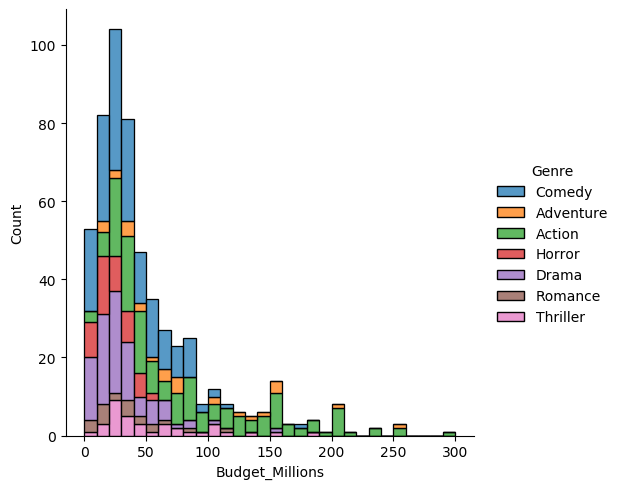
#Histogram

>import seaborn as sns, numpy as np

>sns.displot(data=df, x="Budget_Millions", hue="Genre", binwidth=10, multiple='stack')
# Scatter Plot
>import seaborn as sns
>sns.relplot(x="Critic_Rating", y="Audience_Rating", hue="Genre", size="Budget_Millions",sizes=(30, 400), alpha=.5, palette="muted", height=6, data=df)

The audiences and the critics appear to rate the movies with high budgets much higher than those with lower budgets.
# Boxplots of critics
ax = sns.boxplot(x="Genre", y="Critic_Rating", data=df)
ax = sns.stripplot(x="Genre", y="Critic_Rating", data=df)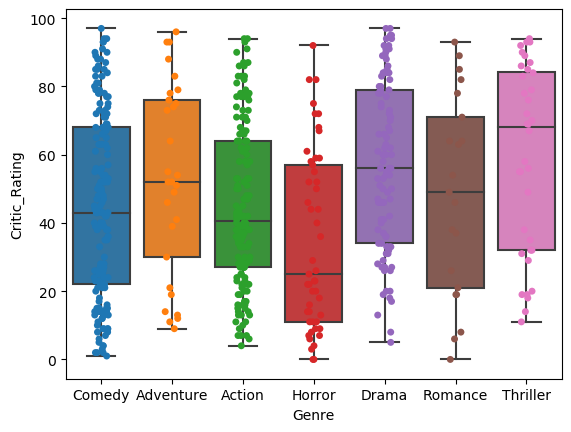
#Boxplots of Audience Ratings
ax2=sns.boxplot(x='Genre', y='Audience_Rating', data=df)
ax2=sns.stripplot(x='Genre', y='Audience_Rating', data=df)
The audiences and critics show some differences in ratings of the thriller category. Looking at the shapes of the plots, the boxplots of the audiences show shorter interquartile ranges which means that the variances and standard deviations are smaller compared to the critics whose plots show longer interquartile ranges.